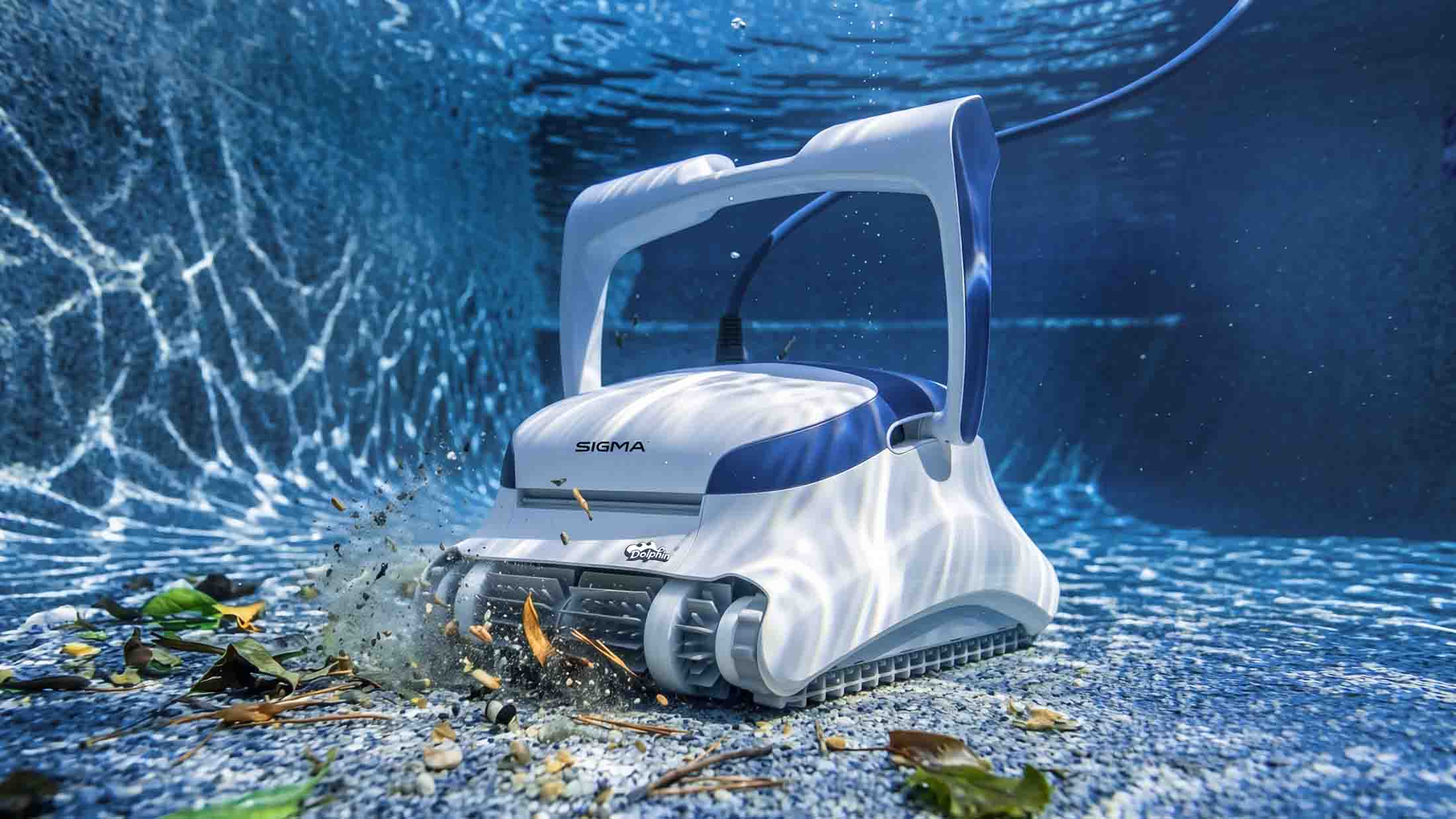
Dolphin Sigma
$2999 $2349 SALE Save $650
Temporarily out of stock


By feature
Top pick: Dolphin Sigma
$2349 today · Free shipping
Navigation is the difference between a robot that covers every square foot and one that polishes the same strip, so we rank four Dolphins on how they find their way.
The short answer
The Dolphin Sigma has the most advanced navigation of the robots in this guide: SmartNav 3.0 with an onboard gyroscope, so it knows its heading and tilt. The Premier runs SmartNav 2.0 scanning over the longest cycle and suits L-shaped pools. Pick the Quantum if ladders and drains are the obstacle, or the Cayman for pools up to 33 ft.
A robot without real navigation crosses the pool, bounces off a wall at whatever angle it arrives, and sets off again. Some areas get five passes. A corner behind the steps gets none, and motors and brushes are spent on floor that was already clean. Navigation is the system that prevents this. It is what a search for the best robotic pool cleaner with navigation is really about: coverage.
A word on what navigation is not. None of the robots in this guide maps your pool with cameras or sonar, and none shows you a floor plan. Dolphin's SmartNav systems scan and work out an efficient route as they go; the Sigma adds a gyroscope so it can measure its own heading. The result to look for is even coverage in an awkward shape, not speed.
The ranking
$2999 $2349 SALE Save $650
Temporarily out of stock
SmartNav 3.0 with onboard gyroscope
The Sigma is the one robot here with a third-generation navigation system and a sensor to back it. SmartNav 3.0 uses an onboard gyroscope to track which way the robot is pointing and whether it is level, climbing or on a slope. That lets it hold straight, evenly spaced lines and recover its heading after a ladder, a drain cover or the cable turns it. In a freeform pool up to 50 ft, that is the difference between a pattern and a guess. The myDolphin Plus app schedules cycles by day and time, so the navigation is expected to work with nobody watching.

$2499 $1949 SALE Save $550
Temporarily out of stock
SmartNav 2.0 scanning, longest cycle
The Premier navigates with SmartNav 2.0 scanning, steadied by dual stabilizers, and gives the system the longest run of the robots in this guide: 3 hours. Scanning plus time is a dependable combination, because a strip missed early has more chances to be picked up later. Its published shapes run to four: rectangle, oval, freeform and L-shaped, the last of which no other robot here lists. A 55 ft cable with a 360-degree anti-tangle swivel keeps the cable from dragging the robot off its route. The weekly timer is set on the power supply, and the warranty is 3 years.

$1799 $1599 SALE Save $200
Temporarily out of stock
Senses ladders and drains
The Quantum's SmartNav 2.0 scanning is described as sensing ladders and drains, two fixtures that commonly interrupt a route. It also navigates more kinds of surface than the others: sun shelves, Baja ledges and stairs are published alongside floor, walls and waterline, so its route includes places the other robots treat as edges. The myDolphin Plus app over Wi-Fi lets you start, stop, schedule and choose cleaning modes, a practical form of navigation control, since you decide what gets cleaned. A weekly timer on the power supply works without the app. It is the lowest-priced 50 ft robot here.

$1299 $1049 SALE Save $250
Temporarily out of stock
Scanning navigation for smaller pools
The Cayman runs SmartNav 2.0 on a smaller, lighter robot. In a pool up to 33 ft the task is simpler, with shorter runs, fewer turns and less cable in the water, and scanning navigation handles it in a 2-hour cycle. Rectangle, oval and freeform shapes are published, with steps, ladders, drain covers and ledges among its listed obstacles. It is rated for in-ground and above-ground pools, which none of the three robots above can say. It ranks last on equipment: the 50 ft cable has no swivel, so cable twist can pull at the route in curvy pools.
The criteria
Good navigation lays passes side by side, like mowing a lawn, so the whole floor is crossed once before any of it is crossed twice. Poor navigation relies on chance and long run times to fill the gaps.
A robot is turned by obstacles, slopes and its own cable. If it cannot tell it has been knocked off line, a neat pattern drifts. A gyroscope measures rotation and tilt directly, which is what the Sigma's SmartNav 3.0 adds.
Ladders, main drains, steps and pop-up heads interrupt a route. The robot has to recognize it has met something, back out and resume, not push against it. One pick here, the Quantum, is built to sense ladders and drains.
Rectangles are easy. Freeform curves, L-shaped legs and long narrow runs are where a pattern is tested. Check each robot's published shapes against your pool before comparing anything else. Of the four picks, only the Premier lists L-shaped pools.
On paper
| Specification | Dolphin Sigma | Dolphin Premier | Dolphin Quantum | Dolphin Cayman |
|---|---|---|---|---|
| Price today | $2349 | $1949 | $1599 | $1049 |
| Cleans | Floor, walls and waterline | Floor, walls and waterline | Floor, walls, waterline, sun shelves and stairs | Floor and walls |
| Scheduling | Weekly scheduler by day and time | Weekly timer: every day, every 2 days or every 3 days | Weekly timer: every day, every 2 days or every 3 days | Timer: every day |
| App | myDolphin Plus (Wi-Fi and Bluetooth) | No app; controls on the power supply | myDolphin Plus (Wi-Fi) | No app; controls on the power supply |
| Filtration | NanoFilters and standard filter cartridges | Multi-Media: NanoFilters, oversized leaf bag and standard fine filters | XXL MaxBin basket with standard and NanoFilter panels | MaxBin basket with fine panels; NanoFilter panels optional |
| Brushes | Quad scrubbing brushes | Dual scrubbing brushes | Dual HyperBrush | HyperBrush |
| Navigation | SmartNav 3.0 with gyroscope | SmartNav 2.0 | SmartNav 2.0 | SmartNav 2.0 |
| Cable | 55 ft with 360° anti-tangle swivel | 55 ft with 360° anti-tangle swivel | 55 ft with anti-tangle swivel | 50 ft |
| Warranty | 3 years | 3 years | 2 years | 2 years |
No Dolphin here builds a camera or sonar map of your pool, stores a floor plan or shows the route on a screen. SmartNav scans and calculates as the robot works. That is enough for thorough coverage, but it sets honest expectations. A single cycle can leave a small patch, usually behind a fixture or in a tight inside corner, and a following cycle usually collects it. Judge coverage over several cycles, not one.
Navigation also cannot see loose objects. Dive toys, a dropped towel or a thermometer on a string will stop any robot, so clear the pool first. And smart routing does not extend reach: top steps and very shallow ledges are missed by most robots.
Before choosing, walk the pool and count what could push a robot off its line, using the list below. A rectangle with a gentle slope and one ladder scores low, and SmartNav 2.0 is the sensible buy. A freeform pool with a deep end, a ledge and two ladders scores high. That is the Sigma's pool.
Owners ask
Not the ones here, and we would rather say so. No Dolphin in this guide uses cameras or sonar to build a stored map. SmartNav scans and plans its route during the cycle, and the Sigma adds a gyroscope to track heading and tilt. A robotic pool cleaner with navigation of this kind covers the pool systematically without ever drawing a map.
SmartNav 2.0 is the scanning navigation used on the Premier, Quantum, Cayman and Escape. SmartNav 3.0, on the Sigma alone, adds an onboard gyroscope, so the robot measures its own rotation and tilt instead of inferring them. In complex pools that shows up as straighter lines and better recovery after an obstacle.
Check the cable first. A twisted or over-long cable pulls the robot back toward the same zone. Then check the filter and for trapped air, since a robot that cannot climb turns back early. If the pattern persists with a straight cable and a clean filter, move the power supply and try again, then call us.
No, and it is not meant to. Standard cycles run 2.5 hours for the Sigma, 3 for the Premier, and 2 for the Quantum and Cayman. Navigation decides how well that time is spent. Good routing uses the cycle to cover everything; poor routing spends it repeating the easy parts.
Yes. The Escape uses SmartNav 2.0 and lists round, oval, rectangle and freeform among its published shapes, which covers most above-ground pools up to its 33 ft rating. The cable is the thing to check: it is 40 ft, so on rounds larger than about 24 ft measure the run from where the power supply will sit, and choose the Cayman's 50 ft cable if it is long.
The verdict
Navigation matters in proportion to how hard your pool tries to turn a robot. If the walls curve, the floor drops steeply or fixtures crowd the route, SmartNav 3.0 is the reason to buy the Sigma. If the pool is L-shaped or a large rectangle, the Premier's scanning and 3-hour cycle cover it. If ladders, ledges or stairs are the issue, the Quantum is built around them. Under 33 ft, the Cayman is enough. Unsure how your pool scores? Ask a Dolphin expert.
Keep reading